How to Fill Word Document Placeholders via Webhook (n8n, Make, Zapier)
Generating documents in response to events helps teams work efficiently. When a new customer completes a Typeform survey, a deal moves to "Closed Won" in HubSpot or Salesforce, or a Stripe payment succeeds, your application should immediately generate a personalized confirmation letter, contract, or receipt without anyone having to start the process.
If you are looking to fill Word document placeholders via webhook, this guide shows you how to connect no-code automation platforms (such as n8n, Make, and Zapier) or your custom backend to TRYDOKU's document generation webhook endpoints.
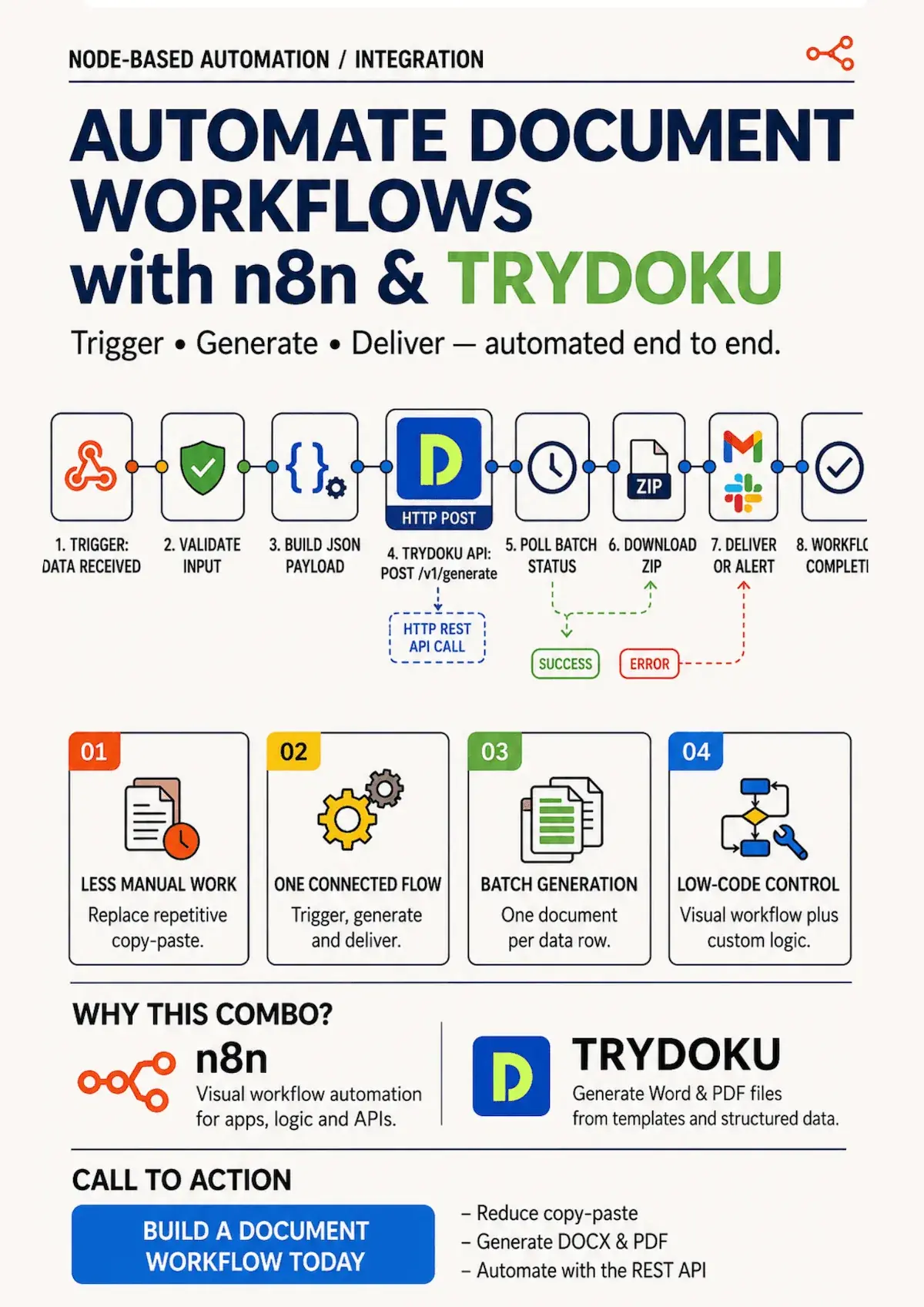
How Webhook-Driven Document Generation Works
Traditional document workflows require an administrative team member to manually check an inbox or database, export records, open a template, and trigger a batch run.
Webhooks automate each step:
- The Event: A business event occurs in your CRM, payment gateway, or web form.
- The Webhook Trigger: The source platform sends an HTTP POST payload containing the event data.
- The Document Engine: TRYDOKU reads the payload, fills the Word placeholders, converts the document to PDF, and returns a secure download URL.
- The Fulfillment: The document is automatically emailed to the customer, stored in Google Drive / AWS S3, or sent to an e-signature platform.
To build this workflow with open-source tools, follow our guide to mastering document automation by connecting TRYDOKU to n8n.
Comparing Automation Architectures
| Feature | Zapier / Make Native PDF Tools | Custom Serverless Scripts | TRYDOKU Webhook Engine |
|---|---|---|---|
| Template Source | Basic HTML or rigid Google Docs | Custom LaTeX / Puppeteer | Standard Microsoft Word (.docx) |
| Styling & Fonts | ⚠️ Highly limited typography | ⚠️ High development maintenance | ✅ 100% Word design fidelity |
| Execution Latency | 10–30 seconds | Variable cold starts | Sub-second processing |
| Setup Time | Moderate | Days of backend coding | Under 5 minutes |
| Dynamic Table Loops | ❌ Unsupported natively | ⚠️ Complex manual looping | ✅ Native {> items }} loops |
How to Set Up Webhook Document Generation (4 Steps)
Step 1: Design Your Word Template with Placeholders
Create your document in Microsoft Word (.docx). Use your standard brand styles, colors, headers, and footers.
Where webhook data should appear, insert placeholder tags:
PAYMENT RECEIPT & SERVICE CONFIRMATION

Receipt Number: {{receipt_id}}
Payment Date: {{payment_date}}
Customer Name: {{customer_name}}
Payment Method: {{payment_method}}
Amount Charged: {{amount_paid}}

Thank you for your business!
Step 2: Upload Your Template to TRYDOKU & Copy Its ID
- Log in to your TRYDOKU dashboard and upload your
.docxfile. - Navigate to your template settings and copy the unique
template_id(e.g.,tpl_receipt_2026).
Step 3: Configure Your Webhook in n8n, Make, or Zapier
In your workflow automation tool, add an HTTP Request node triggered by your source event (e.g. Stripe Payment Intent or Webform submission):
- Method:
POST - URL:
https://api.trydoku.com/v1/generate - Headers:
Authorization:Bearer YOUR_TRYDOKU_API_KEYContent-Type:application/json
- Body:
{
  "template_id": "tpl_receipt_2026",
  "output_format": "pdf",
  "data": [
    {
      "receipt_id": "={{ $json.charge_id }}",
      "payment_date": "={{ $json.created_at }}",
      "customer_name": "={{ $json.customer_name }}",
      "payment_method": "={{ $json.card_brand }}",
      "amount_paid": "={{ $json.amount }}"
    }
  ]
}
For the full payload schema and response structures, see our API Documentation.
Step 4: Handle the Generated Document
TRYDOKU processes the request and responds with binary data or secure download URLs. In the following workflow nodes, you can:
- Attach the PDF directly to an email sent through Gmail or SendGrid.
- Upload the file to your organization's Google Drive or Dropbox folder.
- Send an automated notification to your team's Slack channel.
Explore our features page to learn how conditional rules and dynamic table rows can further customize your webhook-generated documents.
Frequently Asked Questions
Can I trigger webhooks asynchronously for large batches?
Yes. TRYDOKU supports asynchronous generation jobs with webhook callbacks (callback_url), notifying your service when high-volume document archives are ready for download.
How does TRYDOKU handle authentication for webhook endpoints?
All API and webhook requests require authentication using secure Bearer API tokens generated from your account dashboard.
Is client data secure and GDPR compliant?
Yes. TRYDOKU is hosted in Frankfurt, Germany (EU). All webhook payloads and generated documents are encrypted and automatically deleted from temporary storage within 24 to 72 hours in line with GDPR requirements.