How to Create Delivery Notes from Excel: Logistics & Warehouse Automation
Delivery notes accompany shipments in freight, e-commerce fulfillment, manufacturing, and distribution. Also known as packing slips or dispatch dockets, they confirm quantities shipped, provide driver instructions, and verify recipient signatures upon arrival.
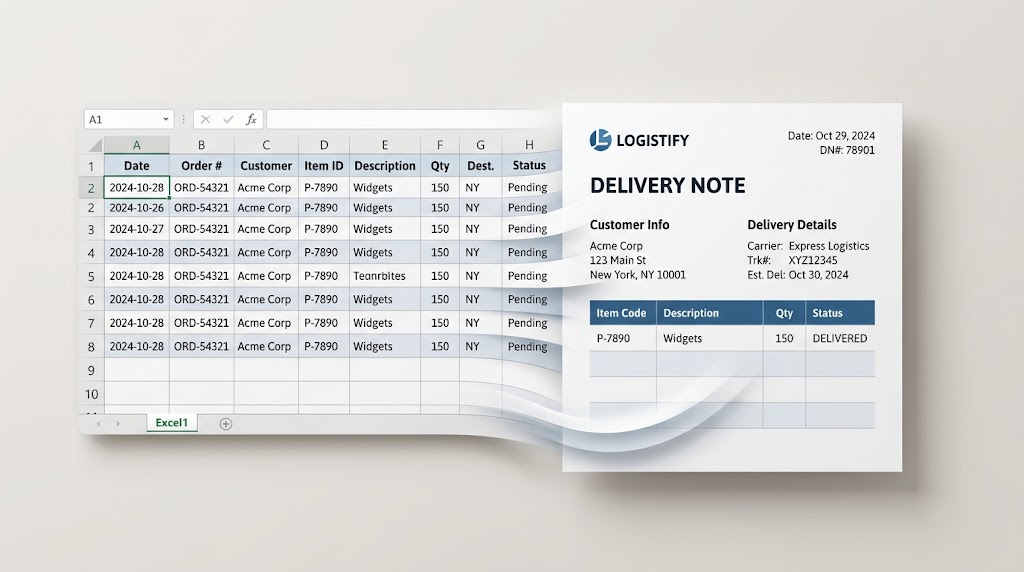
When warehouse managers or dispatch clerks have to create delivery notes from Excel manually—copying order IDs, product SKUs, shipping addresses, and carrier tracking codes into Word one by one—fulfillment slows considerably and dispatch errors increase sharply.
This guide shows you how to generate delivery notes automatically from your Excel order manifests using TRYDOKU, cutting document preparation time by 95%.
How Manual Dispatch Paperwork Slows Fulfillment
Preparing delivery notes by hand creates several risks for a busy logistics team:
- Warehouse Dispatch Delays: Trucks cannot leave shipping docks without accurate delivery notes and bills of lading. Spending two hours manually typing packing slips delays freight departures.
- Incorrect Order Quantities: Copy-paste errors lead to mismatches between what is listed on the paper slip and what is loaded into the truck, causing client disputes and costly returns.
- Driver & Customer Friction: Inconsistent delivery notes without clear recipient fields slow down courier drop-offs and complicate proof-of-delivery tracking.
For more on automating warehouse paperwork, read our related guide to generating delivery notes from Excel for high-volume fulfillment.
Workflow Comparison: Manual vs. ERP vs. TRYDOKU
| Metric | Manual Word Copy-Paste | Enterprise WMS / ERP | TRYDOKU Logistics Engine |
|---|---|---|---|
| Setup Cost | High labor cost | $20,000–$80,000 implementation | Affordable pay-as-you-go credits |
| Fulfillment Speed | 3–5 mins per shipment | Automated, but rigid styling | 100+ delivery notes in < 15 seconds |
| Template Customization | Word document | Complex custom report builder | Standard Microsoft Word (.docx) |
| Output Type | Manual print / PDF | Proprietary thermal printer spool | Organized ZIP of print-ready PDFs |
| Dynamic Order Items | Manual table typing | Database dependent | Native {> items }} repeating rows |
How to Create Delivery Notes from Excel (Step-by-Step)
Step 1: Prepare Your Order Manifest in Excel
Give your order manifest spreadsheet clear column headers in Row 1:
Delivery_Note_Number(e.g., "DN-2026-4401")Customer_Company(e.g., "Vanguard Industrial Supply")Delivery_Address(e.g., "Warehouse Bay 4, Rotterdam Harbor")Dispatch_Date(e.g., "September 21, 2026")Carrier_Name(e.g., "DHL Freight Nordics")Driver_Notes(e.g., "Tail-lift required. Contact receiving dock on arrival.")
If your warehouse system exports raw CSV data, you can inspect and validate your columns using our free client-side Excel to CSV converter.
Step 2: Build Your Delivery Note Template in Word
Design your delivery note in Microsoft Word (.docx). Insert your company logo, shipping terms, warehouse return address, and signature line for the receiving party.
Add placeholders in double curly brackets wherever order data should appear:
OFFICIAL DELIVERY NOTE

Delivery Note #: {{Delivery_Note_Number}}
Dispatch Date: {{Dispatch_Date}}
Carrier: {{Carrier_Name}}

Ship To:
{{Customer_Company}}
{{Delivery_Address}}

Special Driver Instructions:
{{Driver_Notes}}

Received in Good Condition By:
Name: ____________________   Signature: ____________________   Date: ________
To check that all placeholders are correctly formatted and recognized, test your template with our free Word template variable parser.
Step 3: Upload and Connect in TRYDOKU
- Upload your
.docxdelivery note template to TRYDOKU. - Upload your Excel order spreadsheet.
- TRYDOKU automatically matches column headers to your template variables. Review the mapping screen to confirm that each column matches the right variable.
Step 4: Batch Generate Print-Ready Delivery Notes
Select PDF as your output format and click Generate.
TRYDOKU generates a separate, print-ready PDF delivery note for each shipment in your manifest and bundles the files into a single ZIP archive. Each file uses a name from your data (such as DeliveryNote_{{Delivery_Note_Number}}_{{Customer_Company}}.pdf), ready to be printed in the shipping office or emailed directly to the customer’s receiving team.
Frequently Asked Questions
Can I include multiple SKU line items on each delivery note?
Yes. TRYDOKU supports dynamic table loops ({> items }} ... {< items }}) that repeat table rows for each SKU, description, and quantity associated with an order.
Can delivery notes be printed on thermal label printers?
Yes. You can design your Word template with custom page dimensions (such as 4x6 inches or A5) to produce PDFs that fit thermal packing slip pouches exactly.
Is our logistics and client data secure?
Yes. TRYDOKU is hosted in Frankfurt, Germany (EU). All imported data and generated documents are encrypted and automatically deleted from temporary storage within 24 to 72 hours in line with GDPR requirements.