5 Best Microsoft Word Alternatives in 2026
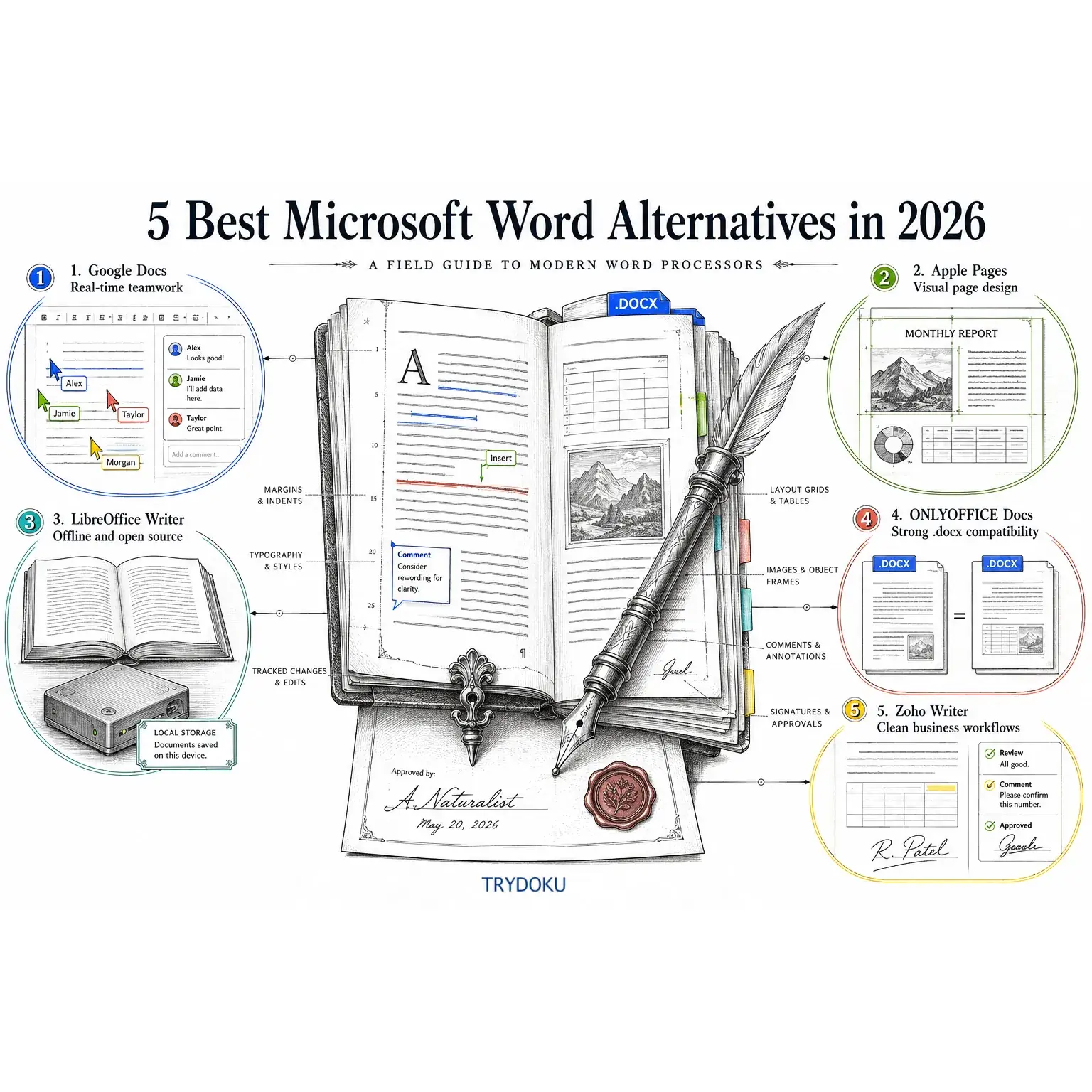
While Microsoft Word remains widely used across enterprise environments, relying exclusively on a Microsoft 365 subscription is no longer necessary for professional document editing. Rising subscription tiers, complex multi-tab ribbons, and distinct requirements for real-time collaboration or local offline privacy have led many professionals and teams to evaluate dedicated alternatives.
Whether you need a collaborative cloud editor for distributed teams, a design-focused layout tool for macOS, a privacy-first open-source application, or an Office-compatible suite you can self-host, several reliable options exist.
In this guide, we review the 5 best Microsoft Word alternatives in 2026, examining their document compatibility, primary features, pricing models, and trade-offs. We also look at how organizations transition from manual one-by-one document editing to automated batch generation with TRYDOKU.
Quick Comparison: 5 Leading Word Processors
The table below outlines how the five alternatives compare across deployment models, .docx handling, offline access, and collaboration models.
| Word Processor | Deployment | .DOCX Compatibility Model | Offline Access | Real-Time Collaboration | Primary Strength |
|---|---|---|---|---|---|
| Google Docs | Web, iOS, Android | Direct Office editing & Drive conversion | Yes (via Chrome extension) | Simultaneous multi-cursor editing | Frictionless team co-authoring in the browser |
| Apple Pages | macOS, iOS, iPadOS, Web (iCloud) | Import and export filters | Yes (Native desktop/mobile apps) | iCloud shared document editing | Visual document layout and styled templates |
| LibreOffice Writer | Windows, macOS, Linux | Native ODF (.odt) with .docx import/export filters |
Yes (Full local installation) | Document comparison & change tracking | Open-source desktop software with no recurring fees |
| ONLYOFFICE Docs | Desktop, Web, Self-Hosted (Docker/K8s) | Native Office Open XML (OOXML) core engine | Yes (Desktop Editors) | Fast & Strict co-editing modes | High visual parity with Microsoft Office formats |
| Zoho Writer | Web, iOS, Android, Desktop | Import/export with Zoho WorkDrive storage | Yes (Desktop & mobile offline mode) | Granular review modes & paragraph locking | Clean writing interface integrated with business tools |
1. Google Docs
Best For
Teams seeking real-time browser collaboration, frictionless sharing, and integrated cloud storage.
Overview
Google Docs is the standard for browser-based co-authoring. Operating inside Google Workspace, it lets multiple contributors draft, comment, and suggest changes in real time within the same document, eliminating file versioning confusion across distributed teams.
Key Strengths
- Simultaneous Multi-User Editing: Live cursor tracking, threaded comments with
@mentions, and integrated action items make team review cycles straightforward. - Continuous Saving & Version History: Documents save automatically to Google Drive with detailed revision logs that let you compare changes and restore previous versions.
- Office File Compatibility: Google Docs supports direct editing of
.docxfiles without requiring an explicit conversion to Google Docs format, preserving the underlying Office file. - Cross-Platform Access: Works across all modern web browsers (Chrome, Firefox, Safari, Edge) on Windows, macOS, Linux, and ChromeOS, with native mobile apps for iOS and Android.
Trade-Offs & Limitations
- Complex Layout Rendering: Dense Word documents with multi-level tables, anchored graphic frames, or specialized macros can display formatting shifts when edited in the browser.
- Offline Configuration: Offline access requires Google Chrome and advance synchronization setup rather than functioning as a self-contained offline application.
- Desktop Publishing Limits: Lacks advanced print preparation tools such as custom baseline grids, dynamic master document links, and precise CMYK color controls.
Pricing
- Personal Use: Free with 15 GB of shared Google Drive storage.
- Google Workspace (Business): Billed annually in the US at $7/user/month (Business Starter), $14/user/month (Business Standard), and $22/user/month (Business Plus). Flexible monthly billing is available at higher per-seat rates ($8.40 to $26.40/user/month).
2. Apple Pages
Best For
Mac, iPad, and iPhone users producing visually styled documents, marketing proposals, and publication layouts.
Overview
Apple Pages comes pre-installed on macOS, iPadOS, and iOS devices. Unlike traditional word processors that treat documents strictly as running text streams, Pages functions as a hybrid word processor and page layout application. Users can freely arrange text containers, media objects, shapes, and image masks across the canvas.
Key Strengths
- Design-Centric Templates: Includes curated templates for proposals, resumes, newsletters, certificates, and books with balanced typography and color palettes.
- Dual Mode Canvas: Lets you switch between standard document drafting and freeform page layout mode for newsletter and brochure design.
- Apple Hardware Integration: Supports Apple Pencil markup on iPadOS, trackpad gestures on macOS, and continuity cameras from iPhone.
- Local Desktop Performance: Runs natively on Apple Silicon with fast file loading and low system resource overhead.
Trade-Offs & Limitations
- Apple Ecosystem Focus: Native applications are restricted to Apple devices. Windows and Linux users must access a browser version via iCloud.com.
- Word Round-Trip Export: While Pages can import and export
.docxfiles, complex layout objects may convert into separate shape objects when opened in Microsoft Word. - Collaboration Scale: iCloud collaboration is suitable for small groups, but lacks the enterprise administrative controls found in Google Workspace.
Pricing
- Core App: Free on compatible macOS, iOS, and iPadOS devices. Optional premium design packs are available through Apple Creator Studio subscriptions.
3. LibreOffice Writer
Best For
Users, researchers, and organizations requiring an open-source, subscription-free desktop word processor that operates entirely offline.
Overview
LibreOffice Writer is developed by The Document Foundation and released under the Mozilla Public License 2.0 (MPL 2.0). As a full-featured desktop application, Writer handles technical manuscripts, academic theses with indexed bibliographies, and complex multi-page reports without requiring an internet connection or account registration.
Key Strengths
- Local Offline Privacy: Files are stored on your local disk or private network storage. No telemetry or cloud synchronization is required to run the editor.
- Open Standards & Legacy Format Support: Uses the ISO-standard OpenDocument Text (
.odt) format as its native structure while offering import and export filters for.docx,.doc, and.rtf. - Power-User Toolset: Includes master document management, cross-referencing, formula editing, index generation, and a built-in database mail merge wizard.
- Multi-Platform Availability: Provides consistent features across Windows, macOS, and Linux distributions.
Trade-Offs & Limitations
- Traditional Interface: The default menu and toolbar interface may feel dated to users accustomed to modern web interfaces, though an optional tabbed NotebookBar can be enabled.
- No Native Real-Time Co-Authoring: Writer is a standalone desktop application; simultaneous real-time multi-user editing requires third-party server integrations such as Collabora Online.
- Style Hierarchy Complexity: Managing page styles, paragraph styles, and character styles requires an understanding of LibreOffice's inheritance model.
Pricing
- Cost: Free and open source (MPL 2.0). Commercial enterprise support is available through ecosystem partners.
4. ONLYOFFICE Docs
Best For
Organizations seeking close formatting parity with Microsoft Office formats, familiar ribbon navigation, and self-hosted deployment options.
Overview
ONLYOFFICE Docs uses Microsoft Office Open XML (OOXML / .docx, .xlsx, .pptx) as its native internal file format. By building its core document model directly around the OOXML specification, ONLYOFFICE minimizes layout discrepancies and font substitution issues when collaborating with Microsoft Word users.
Key Strengths
- Native OOXML Architecture: Edits
.docxfiles directly, helping preserve table layouts, shape alignments, and paragraph spacing across platforms. - Deployment Flexibility: Available as a free desktop application for Windows, macOS, and Linux, as a managed cloud service (ONLYOFFICE DocSpace), or as a self-hosted server cluster for on-premises infrastructure.
- Familiar User Interface: Features a ribbon toolbar layout structured similarly to Microsoft Word, reducing training overhead for transitioning staff.
- Collaborative Modes: Supports two real-time collaboration modes: Fast mode (showing live character changes) and Strict mode (locking paragraphs until saved). When configured with ONLYOFFICE Workspace and Desktop Editors, Private Rooms provide end-to-end encrypted collaboration.
Trade-Offs & Limitations
- Self-Hosting Administration: Deploying and maintaining an on-premise ONLYOFFICE Docs server (via Docker or Kubernetes) requires dedicated system administration.
- Community Edition Limits: The free, self-hosted Community Edition is capped at 20 concurrent document editing connections.
- Plugin Architecture: Supplementary capabilities such as translation or external media embedding depend on separate modular add-ons.
Pricing
- Desktop Editors: Free for personal and commercial desktop use.
- ONLYOFFICE DocSpace (Cloud): Free tier available; Business cloud plans start at $20/admin/month.
- Enterprise Self-Hosted Server: Commercial enterprise licenses are priced based on concurrent connection tiers.
5. Zoho Writer
Best For
Professionals and small businesses looking for a clean, distraction-free drafting environment integrated with business software and document review workflows.
Overview
Zoho Writer is part of the Zoho business application suite. It features a minimal canvas that moves formatting tools into contextual sidebars and pop-ups that appear only when text is selected. For teams managing administrative documents, it integrates with Zoho WorkDrive for storage, Zoho Sign for e-signatures, and external CSV/CRM data sources for merge workflows.
Key Strengths
- Contextual, Distraction-Free Canvas: The drafting area remains uncluttered, keeping your attention on writing while providing complete formatting controls when needed.
- Document Review Controls: Includes granular review workflows, tracked changes, and paragraph-level locking to protect approved legal clauses or executive sign-offs from accidental modification.
- Built-In Merge & E-Signatures: Connects to Zoho CRM, Zoho Creator, and CSV files to merge contact information into templates and collect legally binding signatures via Zoho Sign.
- Multi-Device Sync: Edits sync across web browsers, desktop applications, and mobile apps using Zoho WorkDrive.
Trade-Offs & Limitations
- Ecosystem Synergy: While usable as a standalone tool, Writer delivers its highest efficiency when combined with the broader Zoho business suite.
- Automation Volume Limits: Document merges beyond the monthly allowance included with basic plans require purchasing add-on automation credits.
- Cloud Dependency: Requires adapting to Zoho WorkDrive's file management structure for cloud-based document sharing.
Pricing
- Individual Users: Free for personal drafting and collaboration.
- Zoho Workplace (Business Suite): Standard plans start at $3/user/month and Professional plans at $6/user/month (billed annually, USD, subject to regional variations).
Choosing the Right Word Processor for Your Team
To select the most practical word processor, consider your primary workflow needs:
- For Remote Team Brainstorming & Live Drafting: Google Docs offers the lowest friction for real-time collaboration across mixed operating systems.
- For Design-Heavy Reports on Mac: Apple Pages provides superior layout flexibility and typography controls without requiring separate desktop publishing software.
- For Offline Work & Complete Privacy: LibreOffice Writer runs completely on your local workstation with no ongoing licensing fees.
- For Maximum Microsoft Word File Compatibility: ONLYOFFICE Docs edits
.docxnatively and offers self-hosted deployment options. - For Structured Business Drafting & E-Signatures: Zoho Writer combines a distraction-free canvas with integrated approval and signing workflows.
Beyond Manual Word Processing: Automated Batch Generation with TRYDOKU
Interactive word processors are designed for crafting individual documents one at a time. However, when an organization needs to produce dozens, hundreds, or thousands of standardized documents—such as contracts, certificates, invoices, or delivery notes—manual copy-pasting becomes a repetitive operational bottleneck.
For high-volume administrative workflows, pairing your word processor with TRYDOKU enables automated batch document generation.
Word Processors vs. Batch Document Automation
The table below highlights how interactive word processors differ from dedicated batch document automation engines:
| Feature / Capability | Interactive Word Processors (Word, Docs, Pages, Writer) | TRYDOKU Batch Document Automation |
|---|---|---|
| Primary Use Case | Writing, editing, and formatting individual documents | Generating large batches of personalized documents from data |
| Data Input Method | Manual keyboard entry or copy-pasting values | Direct spreadsheet upload (Excel .xlsx, CSV) or REST API |
| Template Mechanism | Static files or complex desktop mail merge wizards | Word .docx templates using {{placeholder}} syntax |
| Output Formats | Single file save (.docx, .pdf, .odt) |
Batch .docx files, automated PDF conversion, and ZIP archives |
| Workflow Efficiency | Minutes to hours per document | Processes entire spreadsheet batches in a single automated run |
The Template Automation Workflow
Instead of manually editing individual files, teams can build automated document generation pipelines using compatible .docx templates:
- Design a Template in Your Preferred Editor: Create a standard document layout in Microsoft Word, LibreOffice, Apple Pages, or ONLYOFFICE. Insert TRYDOKU placeholder tags using double curly braces, such as
{{client_name}},{{invoice_date}}, or{{contract_amount}}. Review our step-by-step tutorial on how to create Word templates with placeholders. - Verify Template Variables: Use the Free Word Template Variable Parser to inspect your
.docxfile in the browser, review detected placeholders, and catch syntax warnings before processing data. - Clean Metadata for Confidentiality: Use the Free DOCX Metadata Remover to strip author names, company properties, timestamps, and template metadata prior to distribution.
- Upload Data and Generate Completed Documents: Upload your Excel (
.xlsx) or CSV dataset to TRYDOKU, map your columns to the template tags, and generate your batch. You can download individual documents, export a unified ZIP file, or convert the results to PDF.
If your team is evaluating document automation for HR employment contracts, legal client agreements, or learning how to generate multiple Word documents from an Excel list, you can create a free TRYDOKU account to test template batching with your own spreadsheets.
Frequently Asked Questions (FAQ)
Can Word alternatives open and edit .docx files without formatting loss?
Most modern word processors provide reliable .docx compatibility for standard documents. ONLYOFFICE Docs offers high visual parity because its internal core is built directly on Microsoft's Office Open XML standard. Google Docs, LibreOffice Writer, and Zoho Writer also handle standard .docx files cleanly, though documents with complex nested tables, custom shape drawings, or proprietary fonts may require minor layout adjustments.
Which alternative is best for replacing Microsoft Word Mail Merge?
For local desktop workflows, LibreOffice Writer includes a built-in database mail merge wizard. For cloud teams, Zoho Writer connects directly with spreadsheets and CRM contacts. When you need to generate batches of personalized Word or PDF documents directly from an Excel spreadsheet or CSV file without configuring desktop database connections, TRYDOKU provides a dedicated batch document generation web app and REST API.
Are cloud-based word processors secure for confidential business documents?
Major cloud word processors (Google Workspace, Zoho Workplace) employ encryption in transit and at rest, alongside administrative security controls. For organizations with strict data residency mandates (such as GDPR or internal zero-cloud policies), LibreOffice Writer (running entirely offline on local hardware) or an on-premises self-hosted ONLYOFFICE Docs server provide complete control over data storage.
Is LibreOffice Writer free for commercial business use?
Yes. LibreOffice is licensed under the Mozilla Public License 2.0 (MPL 2.0). Organizations can deploy it across unlimited workstations without purchasing commercial licenses or paying recurring subscription fees.