Using TRYDOKU with Claude Code: Build an AI-Driven Document Generator

Integrating Anthropic's AI developer tools with modern document generation APIs opens up powerful new automation workflows. In this comprehensive guide, we will show you how to connect TRYDOKU with Claude Code and standard Claude.ai Projects using OpenAPI schemas to build an automated Word document generator. By combining semantic AI capabilities with our high-fidelity Word templating engine, you can streamline contract assembly, bulk invoicing, and reporting pipelines in minutes.
The Document Automation Bottleneck
For modern developers and SaaS operators, document rendering remains a tedious chore. Traditional solutions require compiling complex PDF rendering code or fighting with heavy HTML-to-PDF converters that mess up typography, page breaks, and margin alignments. Designing a layout in CSS is slow, and non-technical stakeholders cannot easily edit the design.
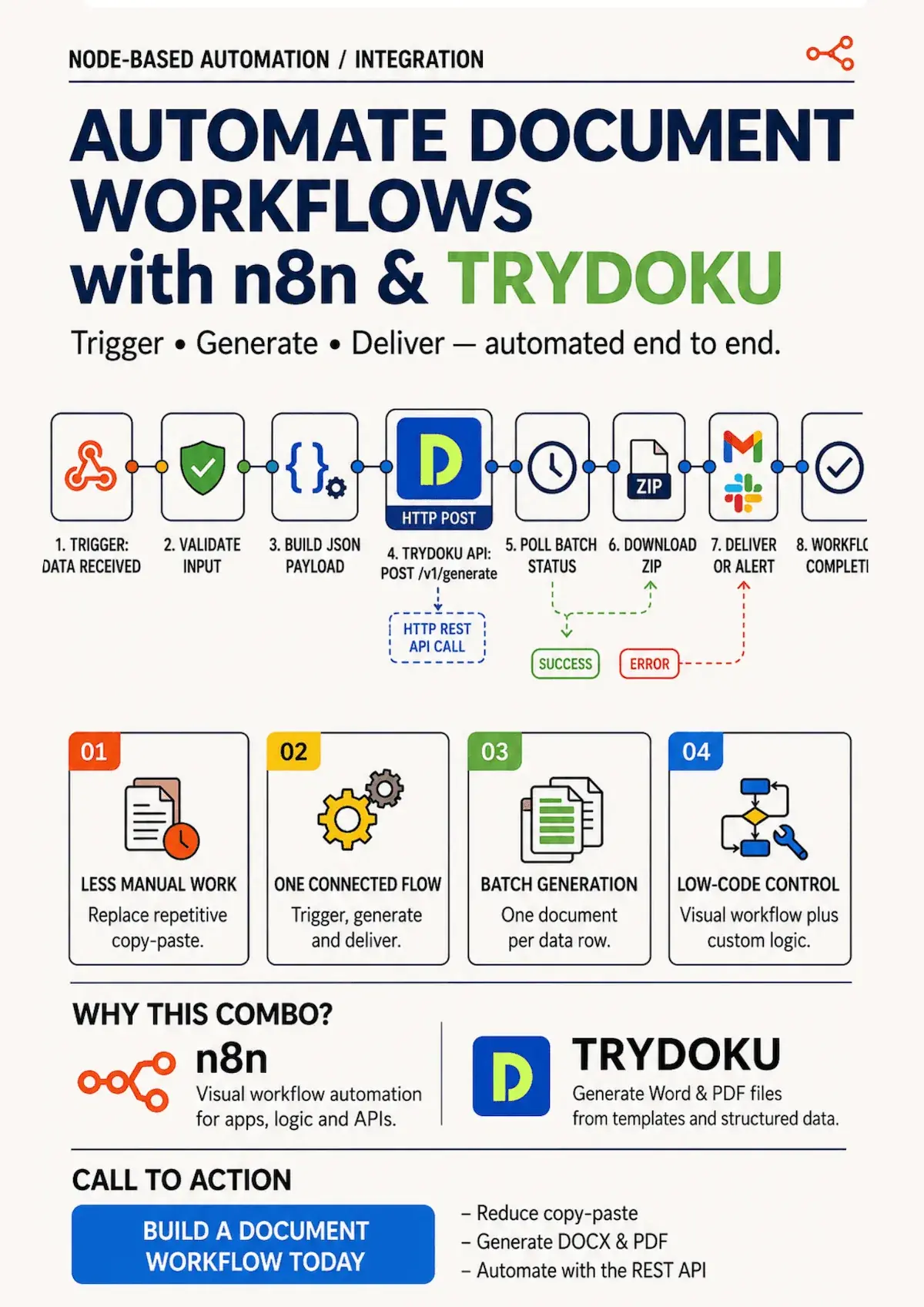
TRYDOKU solves this by using Microsoft Word documents (.docx) as templates. You write standard text placeholders using double curly braces (e.g. {{Client_Name}}), style the document beautifully in Microsoft Word, and upload it. TRYDOKU's high-speed API merges your JSON data arrays into the placeholders and outputs perfectly formatted DOCX files packaged in a downloadable ZIP archive. However, writing integration code and preparing JSON payloads manually still takes time. (Tip: Before integrating with Claude or writing API payloads, you can inspect your templates using our free client-side template variable parser to auto-extract all variable names and loop targets). By bringing Claude Code and Claude Projects into the workflow, you can automate request mapping, code generation, and pipeline monitoring using natural language. This contract-driven approach bridges the gap between unstructured AI outputs and structured, high-fidelity corporate documents.
Approach 1: Project Knowledge via OpenAPI (Manual Web Flow)
This is the only native way to use the standard Claude.ai web chat without deploying external connection layers. By uploading TRYDOKU's OpenAPI schema as custom project knowledge, you enable Claude to understand our endpoints, payload structures, and response schemas. This is perfect for rapid prototyping, generating valid JSON requests, and drafting integration code.
How It Works
- Download the OpenAPI Schema: Retrieve the latest OpenAPI JSON definition directly from your running TRYDOKU instance at
/docs/api/api.json. This file contains the complete definition of thePOST /api/v1/generateandGET /api/v1/batches/{id}endpoints, explaining query parameters, headers, and payload structures. - Create a Claude Project: Log into Claude.ai, navigate to Projects, and create a new project named "TRYDOKU Document Generator".
- Upload Project Knowledge: Upload the
api.jsonfile to the project's custom knowledge library. This provides Claude with the ground-truth contract for your API. - Prompt Claude: You can now prompt Claude inside the project chat to write payload mappings or curl commands. For example: "Based on the uploaded OpenAPI schema, write a curl command to generate a batch of employee offer letters from this array of employee names and salaries." Claude will output the exact JSON payload and curl structure without guessing.
By keeping the API schema in the project's memory, Claude ceases to hallucinate endpoint URLs or request parameters. It knows exactly that the request envelope requires template_base64 and a data array of objects, and that the server responds with a data.id representing the batch identifier.
Approach 2: Agentic Automation with Claude Code CLI (Automated Terminal Flow)
For developers who prefer working in the terminal, Anthropic's new Claude Code CLI provides a powerful agentic interface. Instead of copying and pasting code, you can prompt the Claude agent in your terminal to write, execute, and verify a Node.js script that connects to the TRYDOKU API. Claude Code reads your local filesystem, runs commands, and adapts the script to handle errors dynamically.
Using the CLI, you can orchestrate complex pipelines. For instance, you can instruct Claude Code: "Write a Node script that reads all invoice rows from our local SQLite database, converts our Word template to base64, submits it to the TRYDOKU API, and downloads the ZIP once completed." The agent will analyze your project environment, construct the code, execute syntax checks, and run integration tests autonomously.
The Node.js Integration Script
Below is the complete, robust Node.js integration script. This script is fully compatible with Node.js 18+ (utilizing the native fetch API) and handles the asynchronous TRYDOKU generation lifecycle. It includes bearer token authentication, polling, rate-limit backoff, credit warning annotations, and ZIP downloads. It also includes a runnable main entry point for demonstration purposes.
// TRYDOKU API Integration Script using Node.js 18+ Native Fetch
// This script polls the generation batch until completed.

const TRYDOKU_API_URL = 'https://www.trydoku.com/api/v1';
const API_TOKEN = process.env.TRYDOKU_API_TOKEN;

if (!API_TOKEN) {
    console.error('Error: TRYDOKU_API_TOKEN environment variable is not defined.');
    process.exit(1);
}

async function generateDocuments(templateBase64, dataArray) {
    // Warning: Document generation costs one TRYDOKU credit per accepted row in the data array when the request is created. Failures do not refund this initial charge.
    // Polling endpoints are completely free and consume zero credits.
    console.log(`Submitting document generation batch for ${dataArray.length} items...`);

    const response = await fetch(`${TRYDOKU_API_URL}/generate`, {
        method: 'POST',
        headers: {
            'Authorization': `Bearer ${API_TOKEN}`,
            'Content-Type': 'application/json',
            'Accept': 'application/json'
        },
        body: JSON.stringify({
            template_base64: templateBase64,
            data: dataArray
        })
    });

    if (!response.ok) {
        const errBody = await response.json().catch(() => ({}));
        const errMsg = errBody.message || `HTTP ${response.status}`;
        throw new Error(`Generation failed: ${errMsg} (Status: ${response.status})`);
    }

    const body = await response.json();
    const batchId = body.data.id;
    console.log(`Batch created successfully! ID: ${batchId}`);
    return batchId;
}

async function pollBatchStatus(batchId) {
    const timeoutMs = 60000; // 60 seconds total timeout limit
    const startTime = Date.now();
    const initialDelayMs = 2000;
    let delayMs = initialDelayMs;

    while (true) {
        const elapsed = Date.now() - startTime;
        if (elapsed >= timeoutMs) {
            throw new Error('Timeout: Document generation did not complete within 60 seconds.');
        }

        console.log(`Polling batch ${batchId} status (Elapsed: ${Math.floor(elapsed / 1000)}s)...`);

        const response = await fetch(`${TRYDOKU_API_URL}/batches/${batchId}`, {
            headers: {
                'Authorization': `Bearer ${API_TOKEN}`,
                'Accept': 'application/json'
            }
        });

        if (response.status === 429) {
            console.warn('Rate limit exceeded (HTTP 429). Backing off...');
            const remaining = timeoutMs - (Date.now() - startTime);
            const sleepTime = Math.min(delayMs, remaining);
            if (sleepTime <= 0) {
                throw new Error('Timeout: Document generation did not complete within 60 seconds.');
            }
            await new Promise(r => setTimeout(r, sleepTime));
            delayMs = Math.min(delayMs * 1.5, 10000);
            continue;
        }

        if (!response.ok) {
            const errBody = await response.json().catch(() => ({}));
            const errMsg = errBody.message || `HTTP ${response.status}`;
            throw new Error(`Polling failed: ${errMsg}`);
        }

        const body = await response.json();
        const status = body.data.status;
        console.log(`Current Status: ${status}`);

        if (status === 'completed' || status === 'failed') {
            if (body.data.failed_items > 0) {
                console.warn(`Warning: ${body.data.failed_items} items failed to generate.`);
            }
            return body.data;
        }

        const remaining = timeoutMs - (Date.now() - startTime);
        const nextSleep = Math.min(2000, remaining);
        if (nextSleep <= 0) {
            throw new Error('Timeout: Document generation did not complete within 60 seconds.');
        }
        await new Promise(r => setTimeout(r, nextSleep));
    }
}

async function downloadZipArchive(batchId, zipUrl) {
    console.log(`Downloading completed ZIP archive from ${zipUrl}...`);
    const response = await fetch(zipUrl, {
        headers: {
            'Authorization': `Bearer ${API_TOKEN}`
        }
    });

    if (!response.ok) {
        throw new Error(`Download failed: HTTP ${response.status}`);
    }

    const arrayBuffer = await response.arrayBuffer();
    const buffer = Buffer.from(arrayBuffer);
    console.log(`Successfully downloaded ZIP archive for batch ${batchId} (${buffer.length} bytes).`);
    return buffer;
}

async function main() {
    // Expect the path to a DOCX template file as a command-line argument
    const args = process.argv.slice(2);
    const templatePath = args[0] || process.env.TRYDOKU_TEMPLATE_PATH;

    if (!templatePath) {
        console.error('Error: Please provide the path to a Microsoft Word (.docx) template file.');
        console.error('Usage: node integration.js ');
        process.exit(1);
    }

    const fs = require('fs');
    if (!fs.existsSync(templatePath)) {
        console.error(`Error: Template file not found at path: ${templatePath}`);
        process.exit(1);
    }

    if (!templatePath.toLowerCase().endsWith('.docx')) {
        console.error('Error: The template file must be a Microsoft Word (.docx) document.');
        process.exit(1);
    }

    let templateBase64;
    try {
        const fileBuffer = fs.readFileSync(templatePath);
        templateBase64 = fileBuffer.toString('base64');
    } catch (e) {
        console.error(`Error reading template file: ${e.message}`);
        process.exit(1);
    }

    const dummyData = [{ Name: 'Mock Client', Date: '2026-07-20' }];

    try {
        const batchId = await generateDocuments(templateBase64, dummyData);
        const batchData = await pollBatchStatus(batchId);

        if (batchData.status === 'completed') {
            if (batchData.links && batchData.links.zip) {
                const zipData = await downloadZipArchive(batchId, batchData.links.zip);
                console.log(`Orchestrator completed successfully! ZIP file downloaded: ${zipData.length} bytes.`);
            } else {
                throw new Error('Verification failed: batch marked completed but ZIP download URL is missing.');
            }
        } else {
            throw new Error(`Document generation failed with status: ${batchData.status}`);
        }
    } catch (e) {
        console.error('Integration execution failed:', e.message);
        process.exit(1);
    }
}

if (require.main === module) {
    main();
}

module.exports = {
    generateDocuments,
    pollBatchStatus,
    downloadZipArchive,
    main
};
Comparing the Integration Flows
Choosing between standard web chat projects and the Claude Code terminal CLI depends entirely on your developer workflow and the scale of the automation you are building. The table below outlines the primary trade-offs between the two approaches.
| Metric | Approach 1: OpenAPI + Web Chat | Approach 2: Claude Code CLI |
|---|---|---|
| Workflow Nature | Manual Copy-Paste | Fully Automated / Terminal Agentic |
| Setup Speed | Instant (No environment setup needed) | Fast (Requires Claude CLI and Node.js 18) |
| Ideal For | Prototyping & Request Drafting | Production Pipelines & Bulk Seeding |
| Billing Protection | High (Manual confirmation per run) | Requires care (Disable automatic POST retries) |
Frequently Asked Questions
How are TRYDOKU credits billed?
TRYDOKU credits are charged per accepted non-empty row in your data array when the generation batch is created, regardless of whether individual documents within that batch later fail to process (appearing in failed_items). Therefore, ensure your data values are validated and placeholders map correctly before calling the API. Avoid automatic POST retries on network failures to prevent duplicate charges.
Do I need to pay Anthropic token fees to use this?
Yes. Anthropic API fees for prompts processed by Claude Code or Claude.ai are separate and billed directly by Anthropic. TRYDOKU only bills for document generation credits.
Is my data automatically deleted?
API requests are encrypted in transit using TLS. Input data rows are encrypted at rest during queue processing and automatically cleared from database records upon successful generation. Unprocessed batches, generated ZIP archives, and failed records are pruned automatically within the standard 72-hour system retention window.
Can I run this inside a serverless cloud function?
Absolutely. The Node.js script is fully compatible with serverless systems (e.g. AWS Lambda, Google Cloud Functions) as it uses native fetch APIs and zero external NPM dependencies.
How do I handle nested loops or repeating rows inside Word tables using this script?
To populate repeating table rows (such as invoice line items) dynamically, you must wrap the target row in Word with loop opening and closing tags. In your template document, write {> items }} in the first column's first row cell, place variables like {{description}} and {{price}}, and close it with {< items }}. In your Node.js payload data array, include an items key mapping to a nested JSON array of objects. The TRYDOKU parser will automatically repeat the row for each element in the nested array while keeping all layout styles intact.